Cellpose-SAM
AnnoTrain can train two kinds of segmenter on painted masks: a U-Net, which says which class every pixel is, and Cellpose-SAM, which finds objects that touch each other, cells above all. Pick it per project in the admin panel, under Training > Neural network > Cellpose-SAM; it trains on the local GPU or on the cluster like any other model.
This page explains how it works, with a root cross-section of Brachypodium stained with H&E
(project racines-he-cellules).
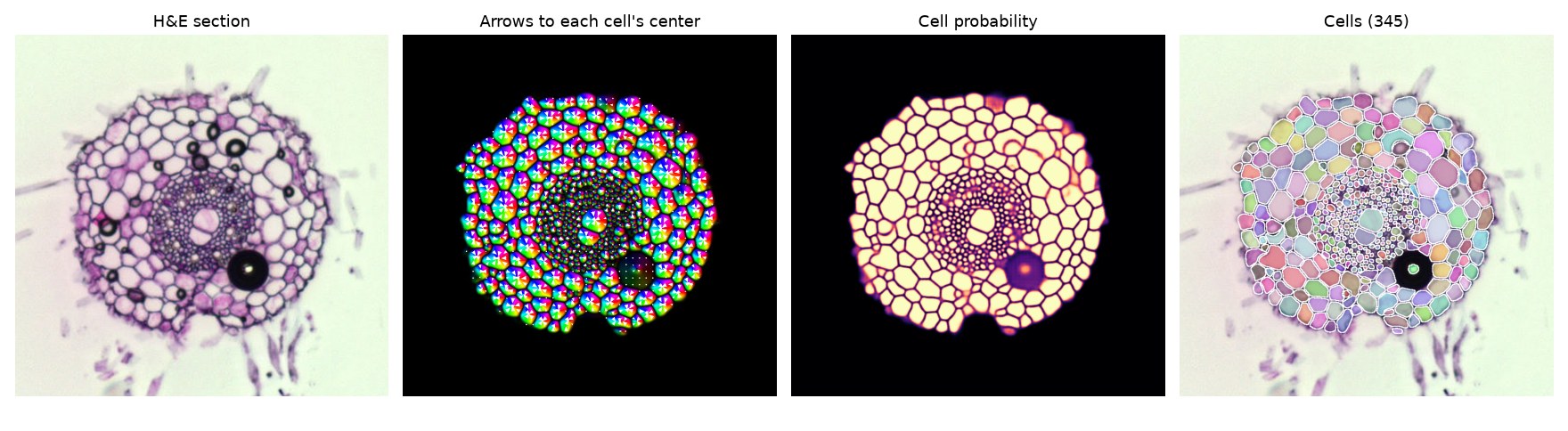
From left to right: the H&E section; for every pixel, the direction of the center of its cell (the color is the direction, the white arrows show a few of them); how likely each pixel is to be inside a cell; the cells found by following the arrows.
The encoder of SAM: a transformer
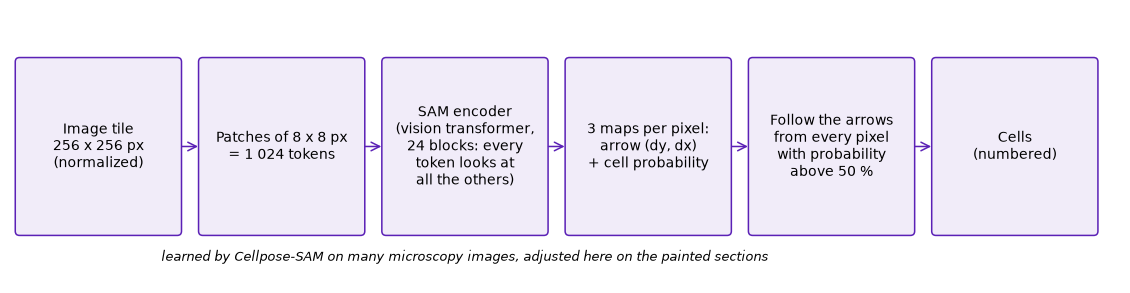
Cellpose-SAM reads the image with the encoder of SAM (Segment Anything, Meta 2023), a vision transformer trained on 11 million images. The image is processed in tiles of 256 x 256 pixels. Each tile is cut into small squares of 8 x 8 pixels, and each square becomes a token: 1 024 tokens per tile. The transformer is a stack of 24 blocks; in each block, every token looks at all the others (attention) and updates itself with what it saw. After 24 blocks, each token knows its whole neighbourhood: this wall continues over there, this pale area is the inside of a large cell, this black ring is an air bubble.
The authors of Cellpose retrained this encoder on thousands of microscopy images of cells of all kinds (Cellpose-SAM, 2025). A last layer turns each token back into 8 x 8 pixels with three numbers per pixel: an arrow (two numbers) and a cell probability.
The arrows and the cell probability
- Cell probability: how likely the pixel is to be inside a cell (third panel above). Walls, background and debris are near 0.
- Arrows (flows): for each pixel inside a cell, the direction of the center of that cell. To teach them, Cellpose computes, for every painted cell, a heat spreading from its center across the cell: the arrows follow the slope of that heat, so they bend around the shape of the cell and always lead to its center, even for a long or curved cell.
The network predicts both from the image alone.
Finding the cells by following the arrows
To turn these maps into cells, every pixel with a probability above 50 % moves step by step along the arrows (about 200 small steps). The pixels of one cell all end up at the same meeting point, and the pixels of the neighbouring cell at another one, even where the wall between them is faint: the two groups of arrows point away from each other. Each meeting point becomes one numbered cell. A last check redraws the arrows of each found cell and compares them with the predicted ones: a cell whose arrows disagree too much is dropped.
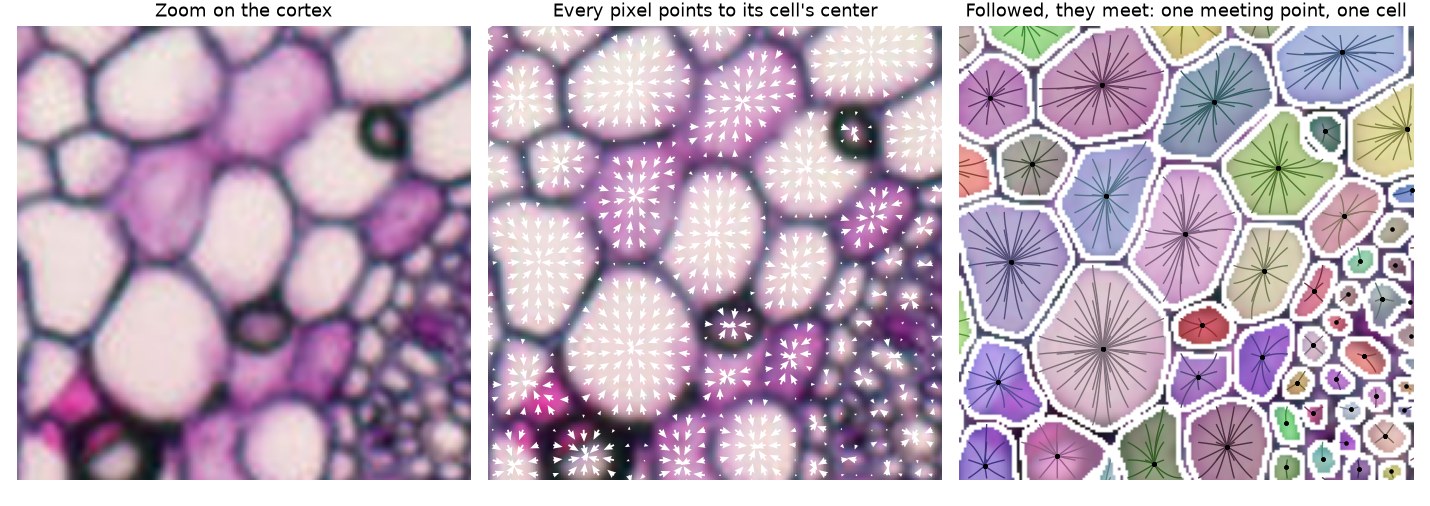
Left: the cortex. Middle: the predicted arrows. Right: paths of pixels following the arrows; the paths of one cell meet at one point (black dot).
Why a few annotations are enough
- The encoder already knows how to see cells. It has seen millions of images and thousands of cell images: training here only adjusts it to this staining, this resolution and these cell shapes (AdamW with a small learning rate, 1e-5).
- Every painted pixel teaches something. A painted cell of 300 pixels gives 300 arrows and 300 probabilities to learn, not one label.
- Each painting is reused many times. Tiles are cut at random places, rotated by any angle, flipped and rescaled (0.75-1.25x).
- A painting does not have to be complete. Unpainted pixels and pixels painted Uncertain are left out of the training, so a section can be corrected where it is wrong and left alone elsewhere.
On racines-he-cellules (October 2026, 18 sections for training and 5 held out), Cellpose-SAM
as published found 5 of the 535 painted cells of the held-out sections right; after one epoch of
training here (about 30 seconds), 251; after ten, 432; at its best (epoch 28 of 40, 20 minutes),
449 (84 %), with 11 merged, none cut and 8 extra. The painting was still the starting Cellpose
segmentation (v4), not yet corrected by people: these numbers say how well the model learns to
draw cells the way they were painted.
How it differs from the U-Net
| U-Net ("classes per pixel") | Cellpose-SAM | |
|---|---|---|
| What it says for each pixel | its class: background, wall, cell interior... | inside a cell or not, and where the center of its cell is |
| How cells are separated | after the fact: connected areas of "interior"; one missing wall pixel merges two cells | by the arrows: two neighbouring cells point to two different centers |
| Starting point | trained from scratch (or with an encoder that knows photos, ResNet-18) | an encoder that already knows cells (SAM, retrained by Cellpose) |
| Annotations needed | many | a few dozen cells to start |
| Best for | regions (organs, leaves, roots on a plate) | many objects pressed against each other (cells, nuclei, grains) |
| Graphics memory | depends on the patch size (up to 23 GB at 1 024 px) | about 7 GB |
On the same 5 held-out sections of racines-he-cellules, both trained with their defaults on the
same 18: the U-Net colors the pixels almost as well (mean Dice 0.68, against 0.71), but cutting
its "interior" areas into cells gives 117 cells right out of 535, 306 merged (a wall pixel
missing) and 1 538 extra small pieces; Cellpose-SAM finds 449 right, 11 merged and 8 extra.
In AnnoTrain
From painted masks to cells. A painted mask has classes, not cells. The cells are the separate
regions of one class: AnnoTrain picks the class painted as the thickest separate regions (in
racines-he-cellules, Cell interior, between the Wall lines). The class painted right around
them is their border (Wall), and the most painted class is the background. Nothing to set:
it is read from the masks, and shown in the model's details.
Training (ml/scripts/train_cellpose.py). Cellpose's own recipe: tiles of 256 px,
1st-99th percentile normalization, AdamW (learning rate 1e-5, weight decay 0.1), 40 epochs by
default. Differences: losses only on painted pixels; the arrows of a cell touching an unpainted or
Uncertain area are left out (its center is unknown); each painting keeps its crowd trust
weight. Validation is the U-Net's: images held out at random, and the epoch that finds the most
cells right is kept.
Measures. After every epoch, the held-out images are segmented whole, as inference does, and compared with their painting:
- Dice per class, like the U-Net (the found cells are drawn back as interior, wall and background);
- cell by cell: right (a found cell overlaps the painted one by more than 50 %, intersection over union), merged (one found cell holds two painted ones or more), cut (one painted cell found as two or more), missed, and extra found cells. Only cells painted whole are counted. The U-Net gets the same cell measures at the end of its training, so both can be compared on the same project.
Predictions (ml/scripts/infer_cellpose.py). For each image: the cells drawn back as the
project's classes (the Calques layer of the annotation screen reads them like a U-Net's), the
numbered cells themselves (16-bit PNG, for counting and measuring), and a confidence map from the
cell probability (p inside a cell, 1 - p outside), which the "where the model hesitates" gallery
sorts by. Each class also gets its own probability map, for the per-class layers of the
annotation screen (as in ilastik: each class's segmentation, 0 or 1, and its probability):
Cellpose-SAM gives one probability, of being in a cell, so the cell interior's is p and the wall
and the background share 1 - p where the cells drawn back put them. A U-Net gives every class's
probability directly.
References
- Stringer, Wang, Michaelos & Pachitariu (2021). Cellpose: a generalist algorithm for cellular segmentation. Nature Methods 18, 100-106.
- Kirillov et al. (2023). Segment Anything. ICCV.
- Pachitariu, Rariden & Stringer (2025). Cellpose-SAM: superhuman generalization for cellular segmentation. bioRxiv.
The figures of this page are drawn by docs/assets/cellpose-sam/make_figures.py.